
Network Lights
© 2004, 2012 Igor Tolmachev, IT Samples Related Software
Network Lights is a Windows program, which blinks keyboard LEDs (Light Emitting Diode), indicating outgoing and incoming network packets on a network interface.
Network Lights lets you monitor network activity (upload/download) from your keyboard ScrollLock and NumLock indicators. Each LED will flicker when network traffic is detected.
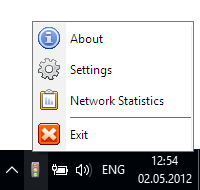
 Run the program; this will add a new icon to the System Tray.
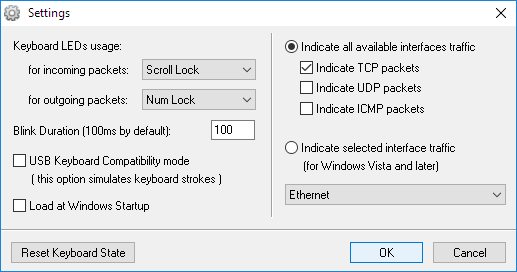
By default, you can monitor your network traffic using the ScrollLock and NumLock leds on the keyboard.
Run the program; this will add a new icon to the System Tray.
By default, you can monitor your network traffic using the ScrollLock and NumLock leds on the keyboard.You can bring up the Settings dialog by clicking the Network Lights icon on the System Tray and choosing the Settings item.
Downloads
version: 1.3 download program (79KB, revised February 17, 2012)
version: 1.2 download program (75KB, revised December 12, 2009)
version: 1.1 download program (44KB, revised June 11, 2006)
download source (VC++)
If you encounter a problem while running this utility or you have any suggestions, comments, you can send a message to support (at) itsamples.com
Comments
 Did you find software that was helpful? Please make a little donation here.